
Hellblade: Senua’s Sacrifice PC Crash [Fatal Error]
Some players reported PC crashes while playing Senua's Sacrifice and we have the right fixes


 3 min. read
  Updated on
Senua is a Celtic warrior that embarks on a haunting vision quest to the homeland of the Northmen into Viking Hell to fight for the soul of her dead lover.
The game has over 1,000 very positive reviews on Steam, meaning that the game is actually cool, despite what players were saying about being more like a movie than a game.
Although, players still reported that they are encountering some errors and bugs that are making their gaming experience not so pleasant. And a frequent issue is Hellblade Senua’s sacrifice fatal error.
If you are encountering one of the issues above, you’ve come to the right place because you will find our guide that will help you fix them.
First, we need to make sure that you meet the minimum system requirements of the game, just check them below.
Hellblade Senua’s Sacrifice System Requirements
MINIMUM:
-
- OS: Windows 7, 8, 10
- Processor: Intel i5 3570K / AMD FX-8350
- Memory: 8 GB RAM
- Graphics: GTX 770 with 2GB VRAM / Radeon R9 280X 3GB
- DirectX: Version 11
- Storage: 30 GB available space
- Additional Notes: Minimum spec screen resolution: 1280×720
Below, you will find the most common errors and bugs in the game and for each issue, you will find a solution or workaround on how to Hellblade Senua’s Sacrifice PC crash.
Hellblade Senua’s Sacrifice crash fix
1. Get the latest graphics driver
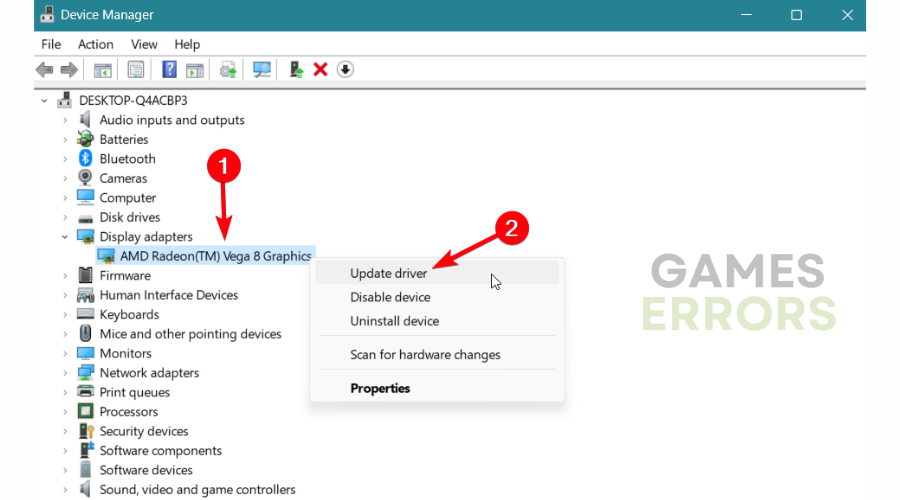
- Type devmgmt.msc in the search box to open the Device Manager.
- Find the Display adapters and right-click on the driver.
- Click on Update driver to start the process.

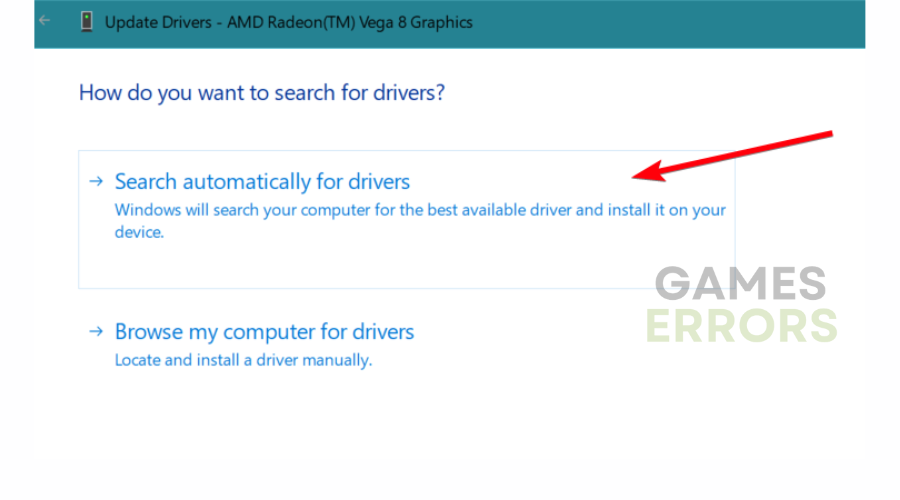
- Pick Search automatically for drivers.
- Restart the PC after it’s completed.
Get PC HelpSoft"}” data-sheets-userformat=”{"2":1327617,"3":{"1":0},"12":0,"17":1,"21":0,"23":2}”> ⇒ Get PC HelpSoft
2. Verify the game files
- Launch Steam.
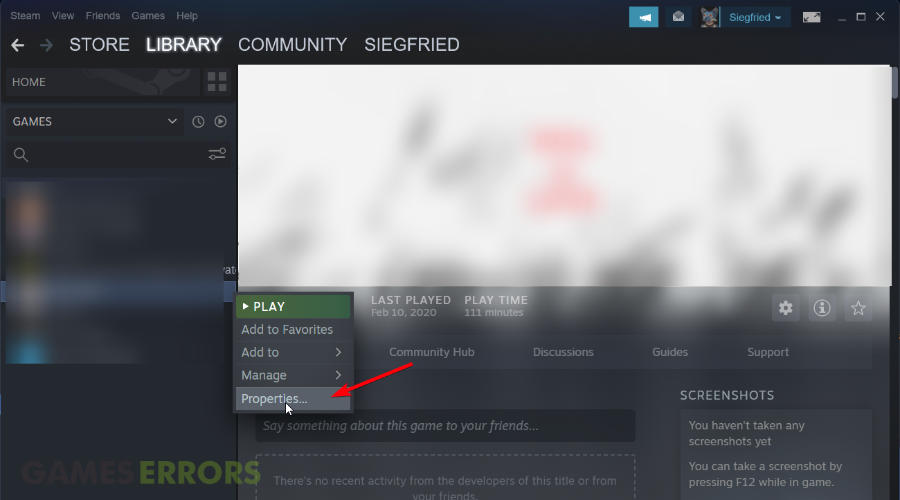
- Right-click on the game and select Properties.
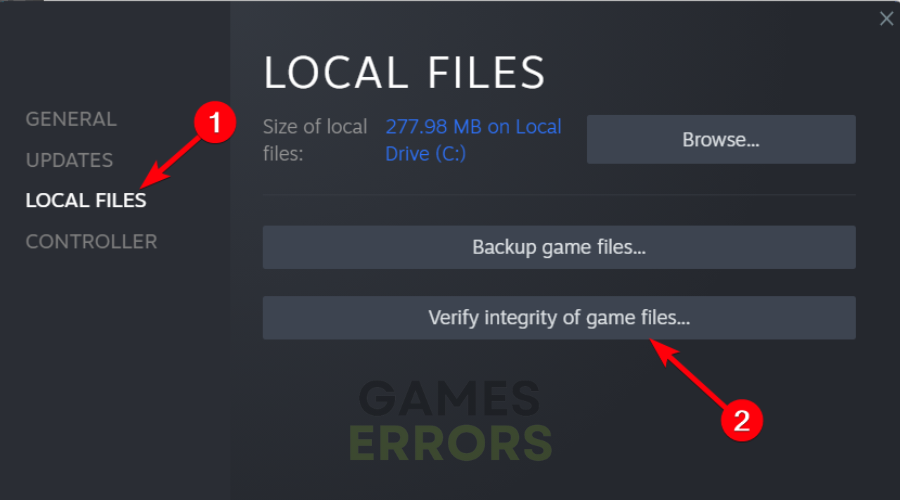
- Select the Local Files tab and click on Verify integrity of game files.
- Validate the files and close the window.
3. Remove background apps
It’s likely that your crashes are generated by other programs running on your system without you knowing it. The safest way is to end any processes in the background that may interfere with your game.
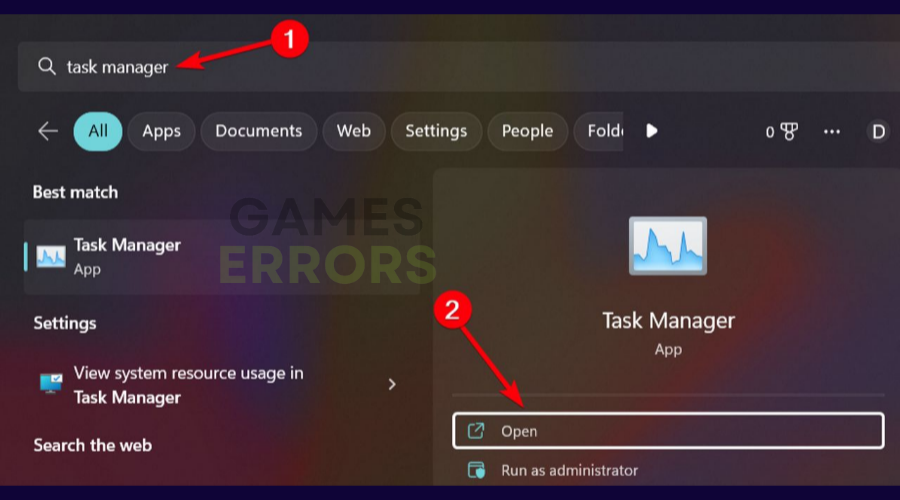
- Open Task Manager.
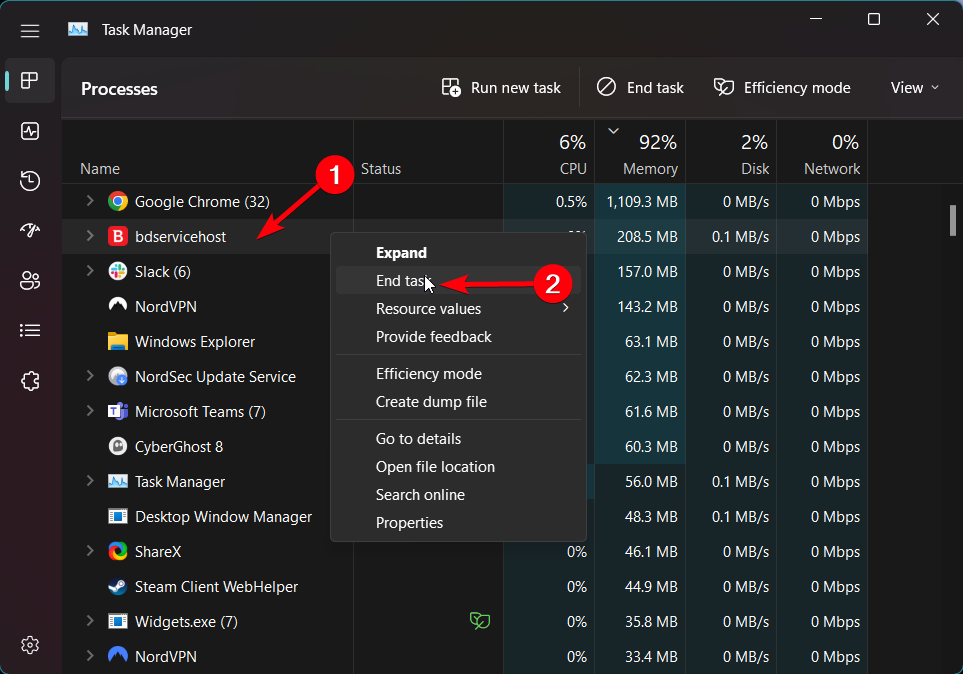
- Navigate to the Processes tab.
- Right-click on the app and select End task.

- Repeat the action for all needed programs.
In the next part of the guide, you can see the related bugs in this gameplay that can also determine crashes and keep you from enjoying this awesome story.
⚙️ Other Hellblade Senua’s sacrifice issues
Hellblade: Senua’s Sacrifice Crashes – Fatal Error
Some players on the Steam forum gave the following solutions that helped them solve the crashes or performance issues that make the game impossible to play.
Workaround:
- Reinstall the game and change graphics settings to low and back to medium/high.
Hellblade: Senua’s Sacrifice Performance Issues
Players are complaining about performance issues like low FPS, freezes, and even fps drops. Some of them can’t get rid of the low frame rates and some encounter them only when they change some areas.
We hope that our guide helped you fix the Hellblade Senua’s Sacrifice PC crash and that now you are enjoying the game.
If you have further questions, please use the comment section below and we will help you as soon as possible.



Improve this guide

User forum
13 messages