
Car Mechanic Simulator 2018 Won't Start: How to Start It
It's frustrating if your game doesn't launch, so be sure to update your GPU driver and check the antivirus protection🛡️


 5 min. read
  Updated on
Car Mechanic Simulator 2018 is available on Steam and it seems that the game encounters a lot of errors. The worst part is that most of these reviews are negative, with people complaining about various bugs and glitches.
In this 2018 version, Car Mechanic Simulator seems to be poorly optimized and players reported launching issues, black screen, crashes, low frame rates, drops of fps, and freezes.
We came up with a guide that will help you find a fix for all of these annoying issues, especially for Car Mechanic Simulator 2018 Won’t Start which is making the game unplayable.
First, you need to check the system requirements of the game below and make sure that your PC can run the game at least at a minimum.
MINIMUM:
-
- OS: Windows(64-bit) 7 or Newer
- Processor: Intel Core i3 3.0 GHz
- Memory: 4 GB RAM
- Graphics: NVidia GeForce GTX 660 2GB VRAM
- DirectX: Version 11
- Storage: 20 GB available space
RECOMMENDED:
-
- OS: Windows(64-bit) 7 or Newer
- Processor: Intel Core i5 3.4 GHz
- Memory: 8 GB RAM
- Graphics: NVidia GeForce GTX 970 4GB VRAM
- DirectX: Version 11
- Storage: 20 GB available space
Car Mechanic Simulator 2018 Won’t Start
- Update your GPU drivers
- Disable the antivirus protection
- Launch the game with admin rights
- Check the game files
- Disable Steam overlay
1. Update your graphics driver
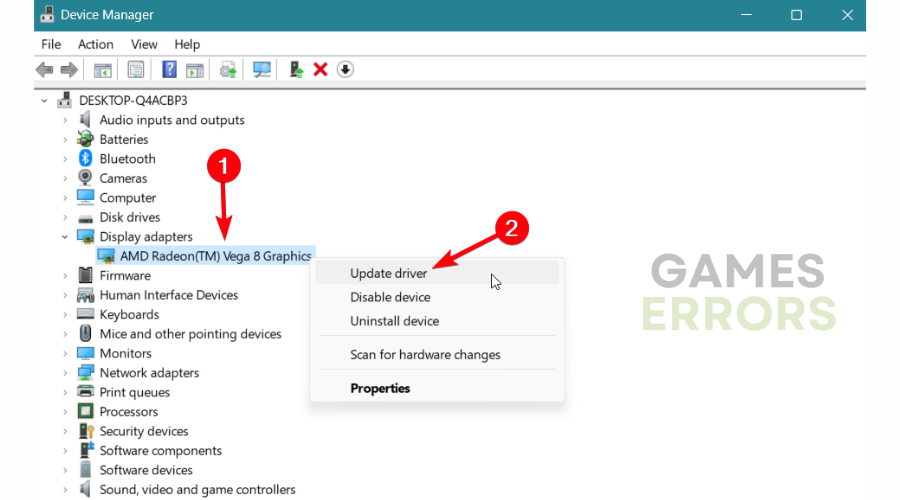
- Right-click on the Windows taskbar button and select Device Manager.
- Select Display adapters and right-click on the driver to select Update driver.

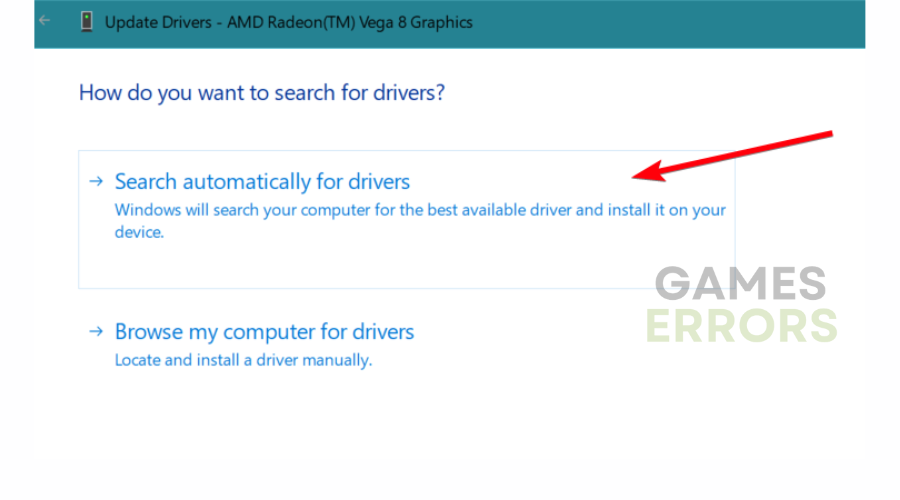
- Pick Search automatically for the driver.
- After updating outdated drivers, restart your PC to complete the process.
2. Disable the antivirus protection
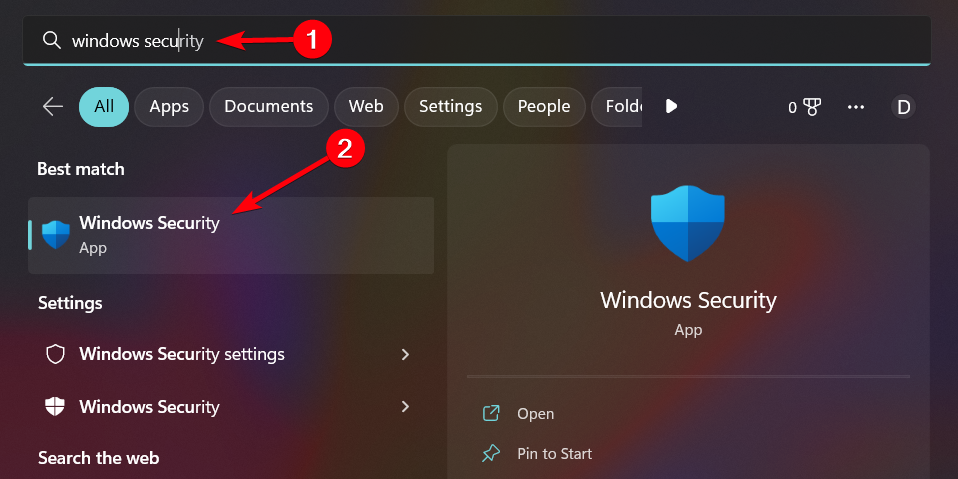
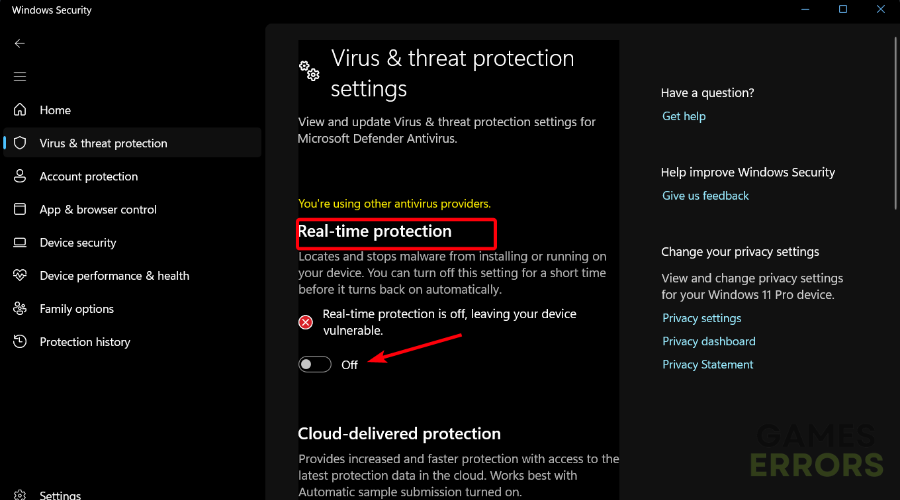
- Enter Windows security in the taskbar search bar.

- Now, select Virus & threat protection.
- Under Virus & threat protection settings, select Manage settings.
- Go to Real-time protection and tick the box to temporarily block it.
3. Launch the game with admin rights
- Type Mechanic Simulator in the search box and open the file.
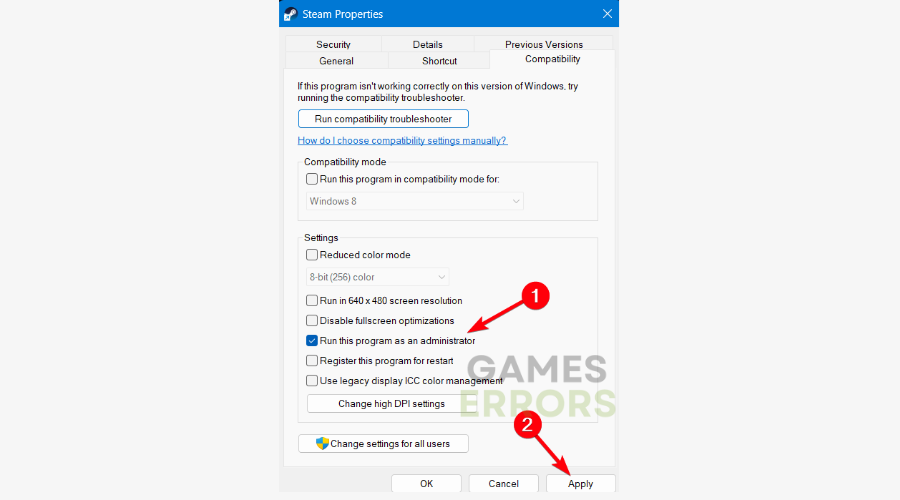
- In the game folder, right-click on the game and select Properties.
- Go to the Compatibility tab and check the Run this program as an administrator box.
- Click on Apply and then OK to close the window.
- Try to launch the game now.
4. Fix the broken game files
- On Steam:
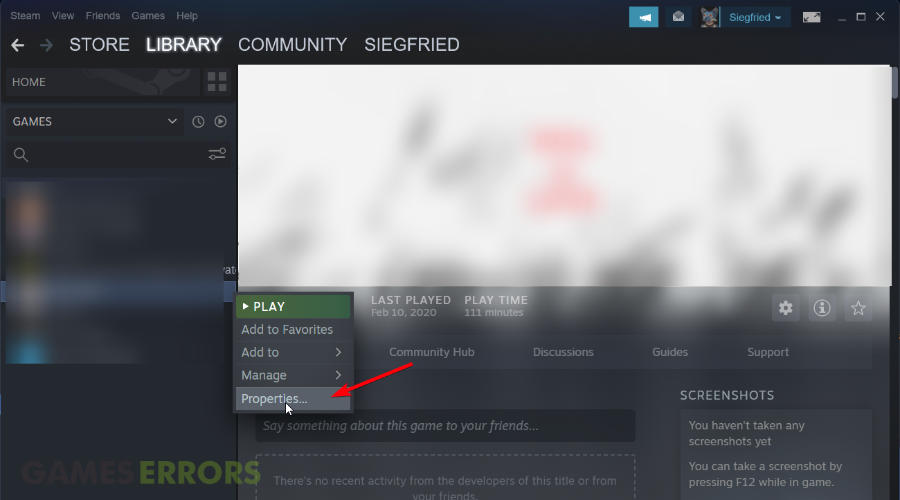
- Open Steam and select Library.
- Right-click on the game and click Properties.
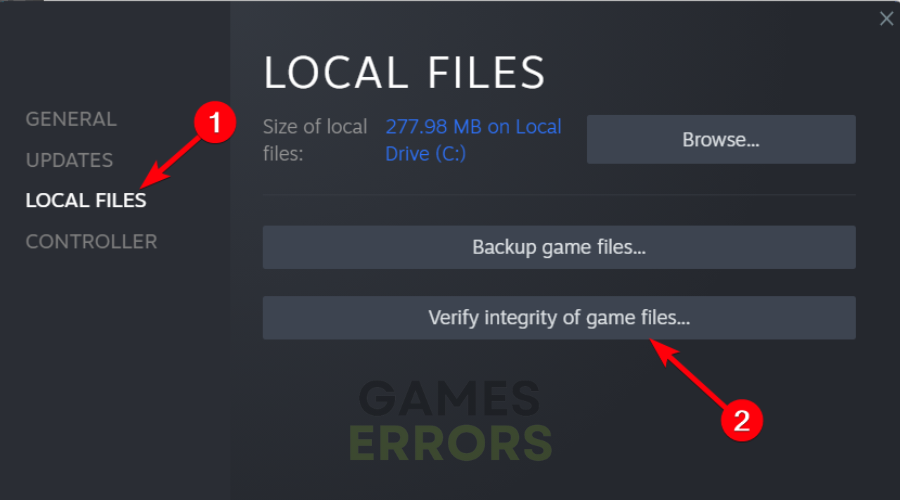
- Navigate to the Local Files and click on Verify the integrity of game files.
- If there are corrupted files, repair them accordingly.
- On Epic Games launcher:
- Launch Epic Games on the desktop and go to Library.
- Select the three dots next to your game and click on Manage.
- Now, hit the Verify button next to the Verify files tab.
5. Disable Steam overlay
- Launch Steam on the desktop and click on Settings.
- Then, navigate to the In-Game tab.
- Uncheck Enable the Steam Overlay while in-game.
- Select OK and close the tab.
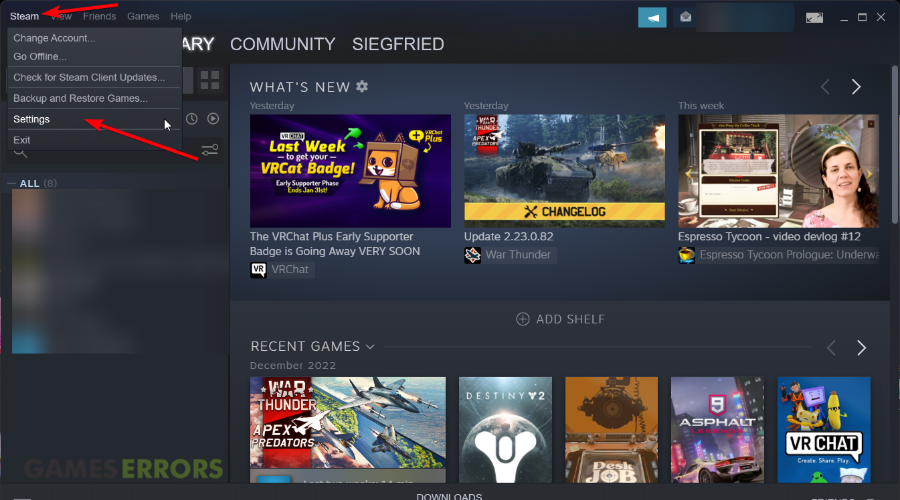
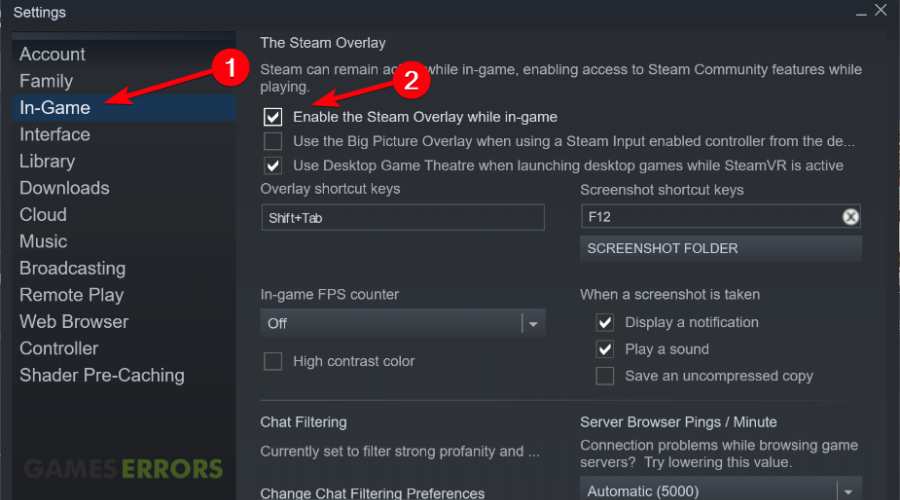
For some players, the Mechanic Simulator 2018 is not starting at all. They try to launch it from the Steam dashboard or they get stuck at the loading screen, sometimes they even encounter the annoying black screen issue.
Due to such game bugs, the players reported an error saying my car doesn’t start anymore in Car Mechanic Simulator 2018.
👾Other related Mechanic Simulator 2018 issues:
Car Mechanic Simulator 2018 Black Screen Fix
As you can see in the picture above, a lot of players are complaining about a black screen issue that is breaking the game. You might encounter this black screen randomly through the game while you remove your tires or maybe when you launch the game at startup.
Also, a lot of users reported this glitch mainly when they were playing with the Mayen M3 car. Developers said that they don’t know if this issue is related to this car or not but at the moment they are investigating and they need your help with output logs.
But, until the developers figure out what they can do to fix this issue, you can use our workaround and fix the issue on your own and enjoy your game.
Solutions for the black screen issue:
- Turn off the radio. We know that this may sound like a stupid solution, but a few players reported that the game crashes to a black screen when the music of the radio changed the title and that if they turn it off nothing happens
- Install Media Feature Pack
- Disable Steam Overlay
- Try to turn off the full-screen mode
Car Mechanic Simulator 2018 Performance Issues
No question that the game is poorly optimized at the moment. It works like crap on high-end PCs and players are getting ridiculously low framerates. Check our workarounds below to optimize your game and get the maximum fps that your PC can get from the game.
Optimization workarounds:
- Turn off VSync
- Try to play the game in different graphic versions like low/medium and see what works best for you
- Make sure that your GPU driver is up to date
We hope that our guide helped you fix your Car Mechanic Simulator 2018 errors and that now you are enjoying the game. Please don’t hesitate to contact us if you have any questions related to the game glitches.



Improve this guide

User forum
35 messages