
Resident Evil 7 Crashing: How to Fix & Avoid Crash on Startup
You can't play Resident Evil 7 due to crashing? Solve it today with our efficient methods


 6 min. read
  Updated on

Players are saying that Resident Evil 7 is a worthy reboot of the franchise, but there are also some technical issues to address. Some players are complaining about errors regarding crashing. More clearly, Resident Evil 7 crashes on startup, but also randomly crashes in the mid-game.
We know that you are here to find a solution to the issue that you are encountering, that’s why we did our best in finding the quickest fixes for you to play the game smoothly without any crashes.
So let’s go ahead and check if your PC meets the minimum system requirements of the game. You must meet at least the minimum system requirements of the game.
If not, you need to upgrade your OS, because this may result in Resident Evil 7 keeps crashing, stuttering, or launching issues. If you don’t meet the recommended specifications, try turning down the graphics settings in case you haven’t already.
💥 Why does my Resident Evil keep crashing?
In a few words, the crashes are generated in this game due to multiple causes such as background apps that are blocking Resident Evil 7 from running properly. Another factor can be outdated driver versions that are incompatible with the game specifications.
Resident Evil 7 SYSTEM REQUIREMENTS:
➖ MINIMUM:
-
- OS: WINDOWS® 7, 8, 8.1, 10 (64-BIT Required)
- Processor: Intel® Core™ i5-4460, 2.70GHz or AMD FX™-6300 or better
- Memory: 8 GB RAM
- Graphics: NVIDIA® GeForce® GTX 760 or AMD Radeon™ R7 260x with 2GB Video RAM
- DirectX: Version 11
- Storage: 24 GB available space
- Sound Card: DirectSound compatible (must support DirectX® 9.0c or higher)
- Additional Notes: Hardware specification targets 1080P/30FPS. May require a reduction in Texture Quality settings or turning Texture streaming to OFF due to high VRAM requirements. *Internet connection required for game activation. The game is still undergoing development, so all PC requirements are subject to change.
✔️RECOMMENDED:
-
- OS: WINDOWS® 7, 8, 8.1, 10 (64-BIT Required)
- Processor: Intel® Core™ i7 3770 3.4GHz or AMD equivalent or better
- Memory: 8 GB RAM
- Graphics: NVIDIA® GeForce® GTX 1060 with 3GB VRAM
- DirectX: Version 11
- Storage: 24 GB available space
- Sound Card: DirectSound compatible (must support DirectX® 9.0c or higher)
- Additional Notes: Hardware specification targets 1080P/60FPS. *Internet connection required for game activation. The game is still undergoing development, so all PC requirements are subject to change.
How do I fix Resident Evil 7 from crashing?
1. Verify the integrity of the game files
You can ensure that the game files are intact using verify game files. Here’s how to do it
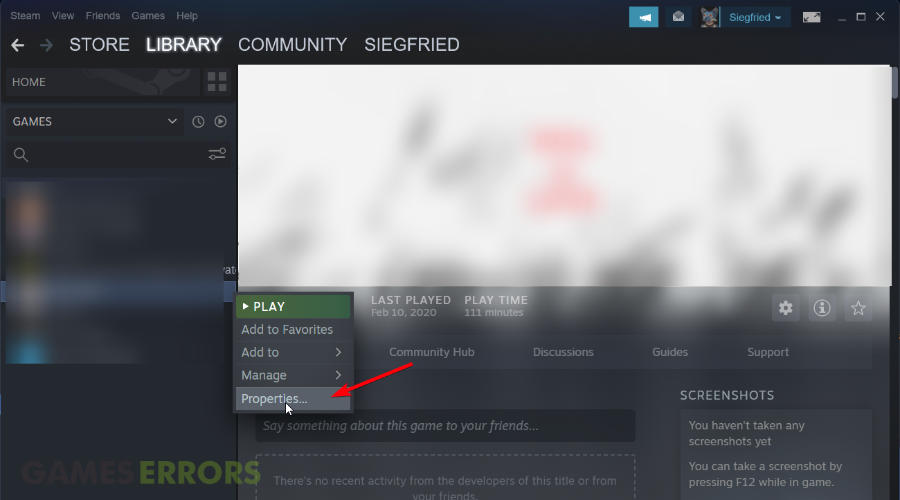
- From your Steam library list, right-click on Resident Evil 7 and select Properties.
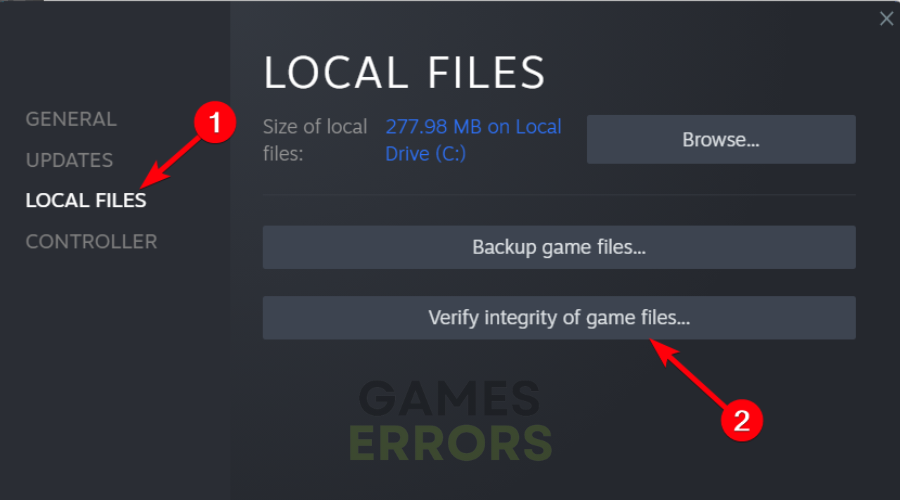
- Click the Local Files tab.
- Click Verify Integrity of Game files and allow the validation process to run its course.
- Repair the damaged files of the game if there are any.
2. Update the graphics driver
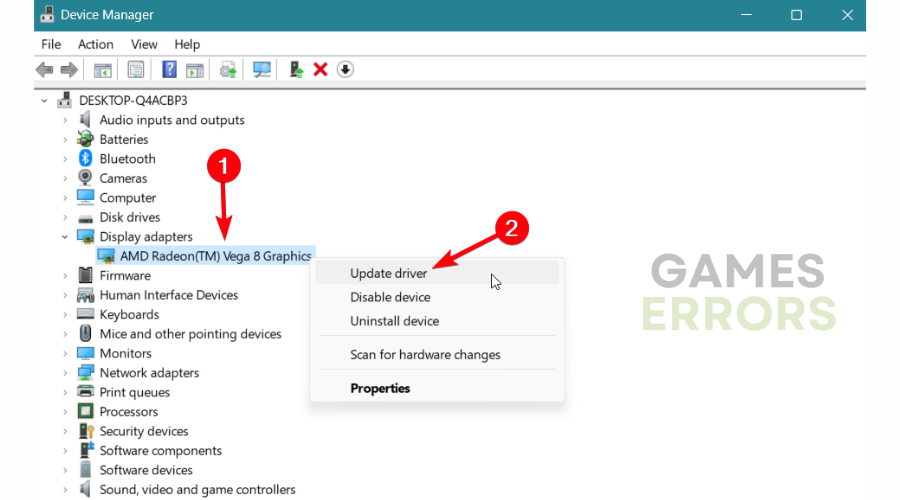
- Click on the search box and type Device Manager.
- Select Display adapters and choose Update driver.
- Select Search automatically for the driver.
- After the update, restart your PC to complete the process.
3. Check for Windows updates
Using this quick solution may resolve different bugs that block your game from running properly due to corrupted system files.
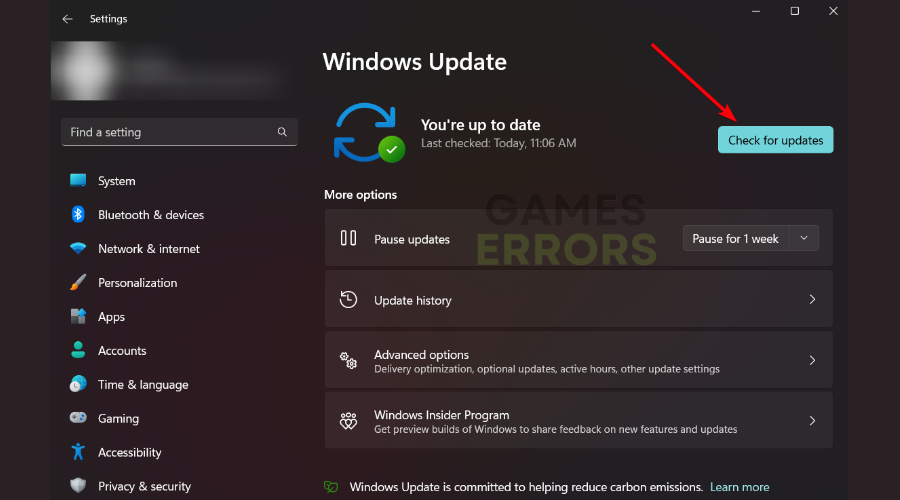
➡️ Access the Windows Update settings → Click on the Check for updates button → Select Install for each update.
🪲 Other errors that can lead to Resident Evil 7 crashing:
Here you will find all the errors that we talked about above and for each one, you will have a solution or a workaround on how to fix it and play the game. Our workarounds are pretty simple to apply to your game, it should not be hard.
Resident Evil 7 Stuttering
We are going to help you fix the stuttering issue first because this is the most common one and a lot of players are complaining about it. You might even have a high-end PC and still encounter stuttering and overall bad performance. Here are some workarounds that you can apply to have smoother gameplay:
- Turn off: Vsync, Dynamic Shadows, and Shadow Cache
- Update your graphic card to the compatible driver
- Change ambient occlusion to SSAO and don’t use HBAO+
Resident Evil 7 Biohazard Black Screen
For some players, the game doesn’t want to start and they receive a black screen, unable to do anything because nothing happens. A player detailed the issue on the Steam Dashboard, you can see what he said below.
So, to fix this issue you can try the things that the guy above tried or you can apply the workaround below and see if it helps you.
Workaround:
Resident Evil 7 Save Data Issue
You might be unable to create a save data for your game. When the save screen appears you can’t select yes and enter does nothing. To fix this issue check the workarounds below.
Workarounds:
- Unplug controllers and keyboard and after saving plug them back
- Press Alt+Tab, save the game, and then go back to fullscreen with Alt+Tab again
If any of these methods didn’t work out for you, check your antivirus software. Some AV software may trigger a false-positive situation and flag certain executables from running. You can temporarily disable the AV software to see if the game behaves differently.
We hope that you managed to fix your Resident Evil 7 errors and that now you are playing and enjoying the game. Plus, you can also check Resident Evil Remaster issues in case you’re having this version of the game.
If you still encounter issues, please comment below and we will help you as soon as possible to fix your error so you can enjoy your game.



Improve this guide

User forum
12 messages