
Dragon Ball Xenoverse 2 Server Not Available: How to Fix
If you experience Dragon Ball Xenoverse 2 connection issues, troubleshoort your Internet 🌐


 3 min. read
  Updated on
Dragon Ball Xenoverse Connection Issues are affecting a lot of PlayStation and Xbox players of the game, many of them reported that they can’t connect to the server or that the servers are already full others are getting disconnected from the server.
The most common Dragon Ball Xenoverse errors on PlayStation 3,4 and Xbox One consoles are: players can’t connect to the server, and they receive this error “DRAGON BALL XENOVERSE-Server is not available. Please try again later.”.
Some PlayStation users are getting constantly kicked out of the game and receiving this error You’re not logged into PSN, although they are connected.
On consoles, the most annoying issue is the Connection problems that seem to be encountered on both PlayStation and Xbox too.
But this is not the only error some players complained about crashes and freezes during the game, and they needed to reset the console to get the game to work again.
How To Fix Dragon Ball Xenoverse Server Not Available
- Check your Internet connection
- Reboot your router/modem
- See if the game servers are available
- Reinstall the game
1. Check your Internet connection
As many players suggested online, you should first make sure that your Internet connection is stable on your PC and that the game is surely connected.
✅ Type Troubleshoot settings in Windows search → Go to Internet troubleshooting → Click on Run next to Internet Connection → Choose Troubleshoot my Internet connection → Let the wizard repair your connection.
2. Reboot your router/modem
You can as well consider rebooting your router in order to refresh your connection and eliminate potential connection issues.
- Turn off your router and unplug it for 10 seconds.
- Move the device position to eliminate interferences.
- Replug your device and turn it on again.
- Connect your PC to the Internet again.
3. See if the game servers are available
A reliable method to find out the root cause of Dragon Ball Xenoverse server issues is to check if the game servers are up at the moment.
You can verify this by checking the Bandai Namco Twitter handle and see if there are any server connection issues.
4. Reinstall the game on Steam
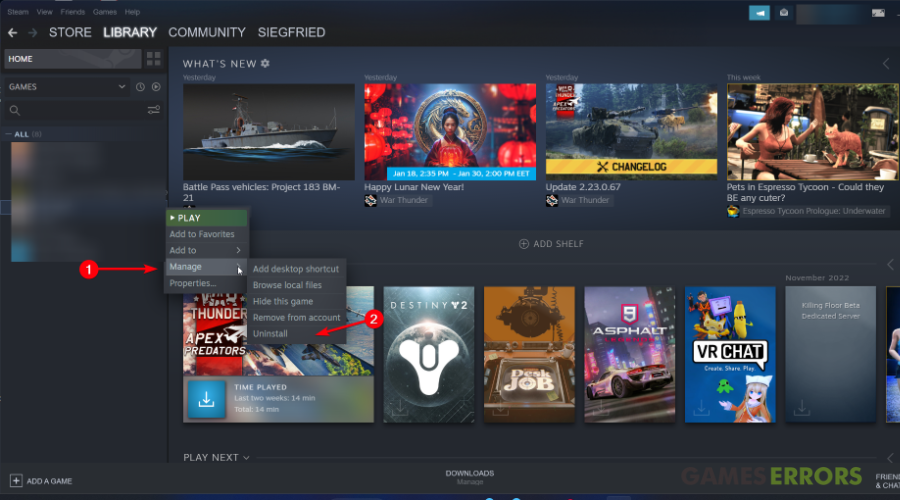
If the solutions from above didn’t resolve the problem, you can always choose to reinstall the game on your device and eliminate various errors or malfunctions.
- For the Steam client, you can simply go to Library > Right-click on Dragon Ball Xenoverse game > Hover on Manage and click on Uninstall.
Related article: How To Fix Dragon Ball Xenoverse Random Crashes, Freezes
We hope that our guide helped you fix the Dragon Ball Xenoverse server Issues. If you have any questions or encounter difficulties, please contact us by leaving a comment below, and we will help you fix your game.



Improve this guide

User forum
47 messages