
[FIX] Call of Duty Advanced Warfare CPU Error 'Your CPU Does Not Meet..'
'Your CPU does not meet the minimum specification for running this title' can be fixed on this gameplay, so solve it carefully here 🎯


 3 min. read
  Updated on
Because many players reported encountering this Call of Duty Advanced Warfare Your CPU does not meet the minimum specification, we came up with some effective fixes so that you can play the game even if you have a dual-core CPU.
You only need to replace a file from the game’s installation folder to repair this error; the file’s download URL and replacement instructions are provided below.
This fix will work for the official game from Steam and other game launchers that have this CoD gameplay.
“I keep getting this error when trying to start MULTIPLAYER. My CPU is clearly over the minimum specs (Running a G3258 at 4.0GHz) but the game will not even start. This really shouldn’t even be an issue. My CPU runs any other game just fine. I just want to find a workaround that will let me play the game without having to drive to Microcenter and buy an i5..”
How to fix Call of Duty Advanced Warfare CPU Error ‘Your CPU does not meet the minimum specification’:
Before you go and try the fixes, it’s best that you make undoubtedly sure that your PC specifications meet the game system requirements and that you’re able to play the game without issues.
1. Verify the processor drivers
This issue may occur if you’re running outdated CPU drivers which may cause this issue and make the game impossible to launch. Here’s what to do:
- Open Device Manager from the search bar.
- Go to Processors and double-click on it.
- Right-click on the driver and select Properties.
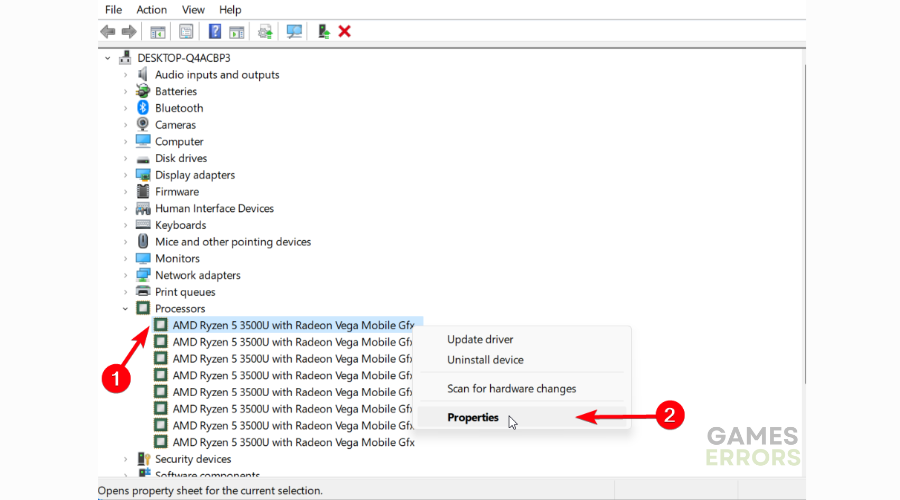
- Now, go to the Driver tab to see the latest version.
- If required, click on Update driver to renew the CPU driver.

Get PC HelpSoft"}” data-sheets-userformat=”{"2":1327617,"3":{"1":0},"12":0,"17":1,"21":0,"23":2}”> ⇒ Get PC HelpSoft
If the primary solution didn’t work out for you, we also suggest trying a workaround that might resolve the CPU bug on Call of Duty Advanced Warfare and allow you to enjoy the game.
If you think it’s worth a shot, this is how to proceed:
1️⃣ Find the config file, it is located here:\Call of Duty Advanced Warfare\players2\config.cfg
2️⃣ See the next settings to change memory reading:
seta r_videoMemoryScale “0.85”
3️⃣ Modify this like this:
seta r_videoMemoryScale “1”
Now, the game should detect the right amount of your current RAM and resolve any issues regarding system requirements.
Have fun playing the game after you fixed the Call of Duty Advanced Warfare CPU error and if you encounter any errors, please contact us with a comment below and we will help you.
Related posts:



Improve this guide

User forum
48 messages